
Smartlead Implementation Mistakes: Sending, Webhooks and CRM Handoffs
Data Engineer and Co-founder, martechdevs
Last updated 10 min read
A reliable Smartlead implementation preserves the relationship between campaign activity, client scope and CRM state. Configure exclusions before import, verify which webhook actually receives events, and make repeated deliveries safe to process. Then test that replies create one owned conversation and opt-outs stop the correct campaigns. A successful webhook response does not prove the CRM update succeeded.
Last updated: 25 September 2026.
Smartlead often sits between a prospecting source, several sending accounts and a CRM. Each system can report success while the overall process fails. The campaign sent the message. The webhook reached an endpoint. The endpoint created a record, but it belonged to the wrong client or duplicated an existing opportunity.
The implementation should make those failures visible. This guide focuses on campaign setup and the event pipeline, with a reusable acceptance specification for operators and developers. The examples are illustrative; run the tests against controlled records in your own environment.
Start with the business events the CRM needs
List the few events that should change sales work. A first message may create an activity. A relevant response may create a review task. A confirmed meeting may update an existing opportunity. An opt-out should update suppression. These actions have different meanings and should not all become “new lead.”
For each event, specify the account identifier, contact identifier, campaign, client, event time, received time and intended change. Assign an owner for cases that cannot be matched confidently. An ambiguous contact should enter a review queue instead of being attached to a convenient but incorrect account.
Our martech integration work connects these systems around explicit state changes. The purpose is to preserve the business meaning of an event as it moves between tools.
Keep campaign progress separate from sales qualification. Smartlead's lead-status guide says Completed can mean either a reply or completion of all sequence steps. Stopped also has several possible causes. Those labels alone cannot tell the CRM that a qualified opportunity exists. Lead status definitions.
Mistake 1: letting import defaults decide eligibility
Before importing, apply current account-fit and relationship rules. Exclude people who should not receive the campaign, including existing conversations that a seller already owns. Record when the source list was created; a list approved several weeks ago may no longer reflect current CRM state.
Smartlead's current campaign guide exposes blocklist, unsubscribe, bounce and existing-lead import controls. It also offers a HubSpot option that can create or update records during import. Review those settings and field mappings before the first production upload. An audience import can therefore be a CRM mutation as well as a campaign action. Current campaign setup.
Test a small file containing an eligible contact, an existing CRM contact, an excluded address and an incomplete record. Write down the expected outcome for each. Reconcile imported, skipped and rejected totals instead of assuming every omitted row is an error.
Use explicit field ownership. The prospecting source may propose a new company size, while the CRM owns account assignment and opportunity stage. Importing contact data should not silently replace the seller's relationship context.
For recurring imports, save the configuration as part of the campaign version. A colleague repeating the process should be able to reproduce the exclusions and mappings without remembering which switches were used last month.
Mistake 2: assuming “global” means every client
Smartlead's blocklist documentation says an unassigned entry applies to campaigns that are also unassigned. It does not automatically cover client-specific campaigns. Blocking a recipient across several client contexts requires appropriately scoped entries for those contexts. Global Block List scope.
This is particularly important for agencies. A workspace-wide operational policy and a client-specific relationship policy are different things. Maintain the scope explicitly rather than relying on the word “global.”
Build a test matrix with an unassigned campaign, a Client A campaign and a Client B campaign. Use controlled addresses and verify which exclusions apply in each. Keep real client data separated during testing and in production event routing.
Record both the address or domain and the relevant client identifier in your suppression process. If a client's campaign is reassigned, review whether the block entries still match its new context. A configuration change can alter enforcement without changing the blocked address itself.
Preserve suppression during migration. A list transfer should carry the necessary exclusion state into the destination, and the receiving system should prove enforcement before sending begins. Our outbound automation guide explains how qualification, suppression and handoffs fit into one operating process.
Mistake 3: debugging the receiver before checking webhook scope
If an event never reaches the intended endpoint, first inspect which webhook definition owns it. Smartlead documents that a user-level webhook takes precedence over client- and campaign-level hooks. A developer can spend hours debugging a healthy campaign endpoint while events are being routed somewhere else. Webhook retry and scope guide.
Create an inventory of webhook definitions: level, client or campaign association, subscribed events, destination and owner. Remove abandoned test destinations through your normal change process. Do not make a new hook simply because an old one appears inactive.
For each required event, trigger a controlled example and confirm the receiving route. Record both the originating campaign and the client expected by the destination. If a shared endpoint serves several clients, resolve its destination from a maintained mapping rather than trusting an arbitrary CRM identifier embedded in an incoming payload.
Capture the actual payload and headers in a secure development environment. Vendor samples are useful starting points, but they do not replace the message your selected event type delivers. Avoid logging full prospect messages into broadly accessible monitoring tools.
Mistake 4: returning success before the event is safe
Smartlead's sample-payload guide describes HTTPS JSON delivery, request identifiers and signature verification, and advises fast responses with processing in the background. Verify the documented authentication mechanism against the actual webhook configuration and received headers before relying on it. A sample event shape is not proof that every event has identical fields. Webhook payload testing.
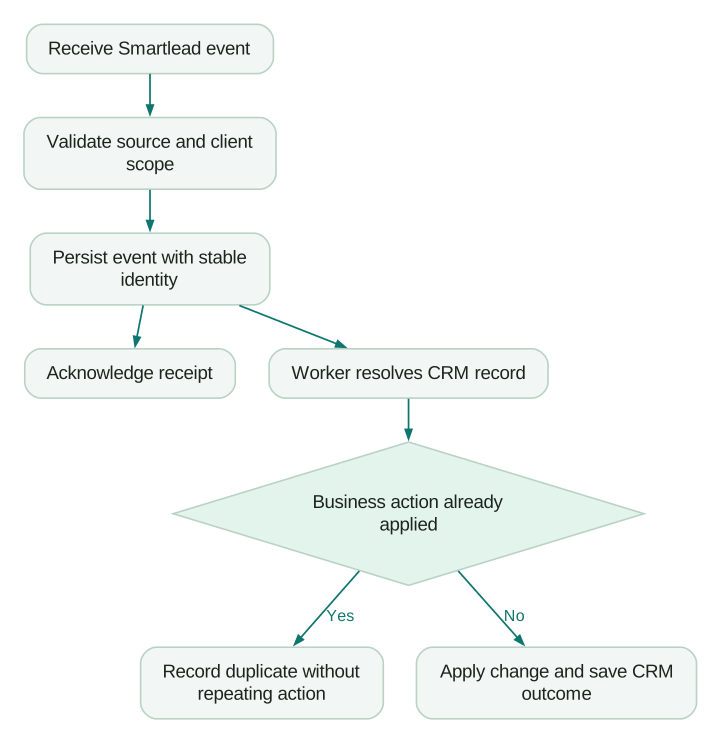
A robust receiver should validate the request, persist the accepted event durably, and then acknowledge receipt. The worker can update the CRM afterward. This ordering is an implementation recommendation: acknowledging before a durable write creates a gap where an event can be lost after the sender believes it succeeded.
Do not wait for a slow CRM request inside the HTTP response path if a queue can separate the work. At the same time, do not return success merely to keep a dashboard green. If the event could not be saved, the system should expose that failure and follow the documented retry contract.
Maintain separate states for received, validated, queued, applied and failed. A 2xx response proves only the receiver's acknowledgement. The CRM action needs its own outcome, identifier and completion time.
Mistake 5: deduplicating the contact instead of the event
The same person can send several legitimate replies. Deduplicating only by email address would discard later conversation events. Conversely, treating each delivery attempt as new can create several tasks for one reply.
Use two identities. The event identity prevents processing the same source event repeatedly. The business-action identity prevents repeating the same intended CRM change when different notifications refer to the same underlying transition.
For example, a reply event and a later categorization event might both indicate that a conversation needs review. They can be separate valid events while belonging to one open review task. Preserve both observations but update or reference the existing task instead of creating another.
Smartlead's retry documentation recommends event-based deduplication and retaining the same identity when replaying a delivery. It distinguishes resending an existing payload from triggering a new event. That distinction should also exist in your recovery tool. Retry documentation.
Do not use an unexamined payload hash as a universal identifier. Retry metadata can change even when the business event is the same, and two legitimate events can have similar content. Prefer a stable source identity when available, and define a documented fallback using the relevant event fields if it is absent.
A worked example: eighteen deliveries, ten replies
Suppose ten unique reply events produce eighteen deliveries because eight are retried. A naive integration creates eighteen CRM tasks. Sales sees duplicate notifications and begins ignoring the system.
Deduplicating the ten event identities produces ten accepted events. But imagine two contacts each sent two legitimate replies while their review tasks remained open. The business rule might require eight open tasks, one per active conversation, with the later replies attached to the existing tasks.
These are different counts:
- Eighteen delivery attempts measure transport activity.
- Ten unique reply events measure source activity.
- Eight active conversations measure the current review workload.
None is automatically wrong. Problems arise when the integration assumes they should be equal.
Now simulate a CRM timeout after the CRM has actually created the task. The worker should check for the existing action before retrying creation. Otherwise, transport deduplication alone will not stop duplicates caused inside your own processing loop.
Store the source event, action identity and resulting CRM record together. That makes it possible to explain an incident without reading every mailbox manually.
Mistake 6: letting late events reverse newer decisions
An event's arrival time is not always the time the underlying action happened. Build the worker to tolerate delayed delivery and replay. Do not let an old “interested” classification automatically reopen a person who later opted out.
Define precedence by business meaning. Suppression should remain authoritative until an explicit, valid change is approved through the appropriate process. A delayed activity can be added to history without replacing the current eligibility state.
For less definitive transitions, compare source event time and current CRM state. If a task is already completed, a retry of its creation event should remain a historical duplicate. A new reply after completion may require a new task, but that is a separate business rule with a new action identity.
Smartlead's API reference distinguishes campaign-level operations from global lead unsubscribe and blocklist operations. Select the operation that matches the intended scope, then verify its effect on current and future enrollment. Do not assume a campaign pause is a permanent suppression. API reference.
This state model is also where lead routing matters. Ownership should survive a delayed event unless a valid reassignment rule applies.
Mistake 7: monitoring volume without monitoring gaps
Track the age of the oldest unapplied event, not just how many requests the endpoint receives. A busy receiver can hide a worker that stopped updating the CRM hours ago.
Use a small operational report: events received, unique events accepted, actions completed, actions awaiting retry and records requiring manual review. Break it down by client and event type. A healthy total can mask a completely broken unsubscribe route for one client.
Reconcile against source activity for a defined window. When the counts differ, distinguish expected duplicate deliveries, legitimate exclusions, unresolved matches and actual missing events. Document the lag allowance so a temporarily delayed event is not confused with a permanent loss.
Before release:
Checklist
- Import tests preserve CRM ownership and exclude the intended records.
- Blocklist behavior is verified for each client scope used.
- Required events reach the intended endpoint despite webhook precedence.
- Duplicate delivery creates one accepted event and the intended business action.
- A CRM timeout after creation does not create a second task on retry.
- A late event cannot reverse an opt-out or overwrite newer relationship state.
- Failed and unmatched events have an owner and a documented replay path.
Keep a small set of controlled records for regression checks after configuration changes. The Instantly versus Smartlead comparison can help with platform selection, but implementation quality depends on proving these handoffs in the selected platform.
Questions people ask
Why is my campaign webhook receiving no events?
Check the configured level and destination before debugging application code. A higher-level hook may own the event route, so verify the actual destination with a controlled event and an inventory of active webhook definitions.
Does a successful webhook response mean the CRM is updated?
No, acknowledgement and business processing are separate stages. Persist the event before acknowledging it, then record the CRM outcome independently so queued or failed work remains visible.
Is email address a good deduplication key?
It identifies a contact route, not a unique event. The same address can generate multiple legitimate replies, so use event identity and a separate business-action rule to prevent duplicate work without losing conversation history.
Does an unassigned blocklist entry cover every client?
Smartlead's documented scope does not work that way. Verify exclusions in each client context you use and preserve the client association when importing or migrating suppression records.
What should happen when an old event arrives late?
Add it to the audit history and evaluate whether it can still change current state. A stale classification should not reverse a later suppression or recreate completed work, while a genuinely new reply may require a new review action.
Sources
- Smartlead lead status definitions, accessed 25 September 2026.
- Current campaign setup, accessed 25 September 2026.
- Global Block List, accessed 25 September 2026.
- Webhook retries and scope, accessed 25 September 2026.
- Webhook sample-payload testing, accessed 25 September 2026.
- Smartlead API reference, accessed 25 September 2026.
Written by
Jafrin Akter AloData Engineer and Co-founder, martechdevs
Jafrin Akter Alo is a data engineer and co-founder of martechdevs, where the team has delivered 74+ martech, data and growth stack implementations.