
Metabase Implementation Mistakes: Fix Models, Permissions and Performance
Data Engineer and Co-founder, martechdevs
Last updated 9 min read
A reliable Metabase implementation needs more than working dashboards. Define what each row represents, test access through every permitted route, distinguish cached results from fresh data, and protect the application configuration. The most damaging mistakes often produce plausible numbers or apparently restricted screens, so acceptance tests must examine the underlying records and actual user permissions.
Last updated: 13 October 2026.
A report can load quickly, look polished and still multiply revenue. A restricted collection can hide a dashboard while leaving its underlying data accessible elsewhere. These failures are easy to miss when the launch checklist ends at “the charts work.”
Use the following checks before a new deployment or when investigating an existing one. They focus on symptoms a marketing or revenue team can observe, the mechanism behind them and a concrete way to verify the repair.
Start with one decision and a known answer
Pick one report that informs a real action: reallocating campaign spend, reviewing renewals or prioritizing accounts. Write down its source tables, reporting period, expected total and permitted audience.
Keep a small set of reference records containing ordinary and exceptional cases. Include a customer with several orders, a missing relationship, a refund and a record near the reporting day's boundary. Those records become a repeatable acceptance pack.
Our warehouse and reporting work uses explicit data definitions and access requirements to scope the implementation. If your team cannot state what a number includes, redesigning the chart will not make it trustworthy. Start with a metric contract for the decision-critical measures.
Mistake 1: exposing raw tables without explaining their grain
A table called orders might contain one row per order, one row per item or a history of every order update. Those meanings produce different counts and sums.
Document the grain beside the dataset. “One row per current order, including canceled orders” is much more useful than “Order information.” Add the key, timestamp meaning, currency and exclusion rules.
Metabase supports display names and descriptions, but its metadata settings change presentation rather than the underlying database. Its documentation also warns that hiding a table is not a permissions control: a user with suitable SQL access can still query it. Metadata guidance.
Use metadata to make correct choices easier. Use data models and permissions to make the required behavior real.
For an acquisition report, expose a prepared dataset with an agreed customer identifier and revenue definition. Keep ambiguous fields such as amount, value and created_at out of the main exploration path until they have meaningful names and explanations. A user should not have to infer whether an amount is cents, gross sales or recognized revenue from its magnitude.
Mistake 2: joining two detailed tables and trusting the total
Metabase's query builder can join tables or saved questions from the same database. It commonly proposes matching keys from known relationships, but a valid key match does not guarantee that the result preserves the grain you intended. Joining data.
Consider an illustrative customer with three orders worth $100, $100 and $50, and three marketing touchpoints. Joining the order rows to touchpoint rows only by customer creates nine rows. Summed order value becomes $750 instead of $250.
Counting distinct order IDs can restore the order count while leaving the revenue sum wrong. Summing distinct amounts is also wrong: the two legitimate $100 orders collapse, producing $150.
For a customer-level report, aggregate each source to one row per customer before joining. This portable SQL example demonstrates the intended structure using fictional data:
WITH orders(customer_id, order_id, amount) AS (
  VALUES ('a', 'o1', 100), ('a', 'o2', 100), ('a', 'o3', 50)
),
touches(customer_id, touch_id) AS (
  VALUES ('a', 't1'), ('a', 't2'), ('a', 't3')
),
order_summary AS (
  SELECT customer_id, COUNT(*) AS orders, SUM(amount) AS revenue
  FROM orders
  GROUP BY customer_id
),
touch_summary AS (
  SELECT customer_id, COUNT(*) AS touches
  FROM touches
  GROUP BY customer_id
)
SELECT o.customer_id, o.orders, o.revenue,
       COALESCE(t.touches, 0) AS touches
FROM order_summary AS o
LEFT JOIN touch_summary AS t
  ON o.customer_id = t.customer_id;
The expected result is one row: three orders, $250 revenue and three touches. Adapt the literal-row syntax if your warehouse requires it.
This solves the customer-level question only. It does not allocate revenue to channels. If you need a channel breakdown, define an attribution rule and its weights separately. Adding a channel column back to the touch summary changes its grain and can recreate the duplication.
Validate the sum and row uniqueness before and after every new relationship. Include a customer with no touches so the report does not silently exclude untracked acquisition.
Mistake 3: restricting one group while another grants broader access
Metabase permissions are assigned through groups. A person in multiple groups receives the most permissive applicable access, and everyone belongs to All Users by default. Review that baseline before assuming a restricted group establishes the desired boundary. Permissions introduction.
Build two separate permission tests. First, can the person reach the intended saved content? Second, can they query or retrieve data beyond the intended scope? Collection access and data access answer different questions.
Use ordinary test accounts with the same memberships as real users. Testing as an administrator proves very little about a manager's experience.
Record the expected result for each account: the customer IDs visible, fields available, ability to create questions and ability to download results. Then try an account with an additional group membership. This catches accidental broad grants introduced during onboarding or team changes.
If a test fails, preserve the evidence and identify the granting path. Repeatedly adding restrictions to the newest group can make the configuration harder to understand without changing the effective access.
Mistake 4: assuming row security covers every SQL question and public link
Metabase's row and column security applies to its supported query-builder paths. The current documentation says it does not apply those restrictions to saved SQL question results or public questions and dashboards. Native SQL access needs a different enforcement design, such as supported database impersonation; saved SQL content also needs appropriate collection restrictions. Row and column security limits.
Treat this as an access-design decision. Do not publish a broad SQL question into a collection used by a restricted audience and assume the viewer's regional attribute will rewrite it.
Create an inventory of the routes your users actually have: dashboards, saved questions, SQL editor, downloads, public links, embeds and scheduled deliveries. Choose enforcement appropriate to each route and verify it with restricted accounts.
For a regional sales report, seed the test database with one record that belongs to the permitted region and another that must remain inaccessible. Check the returned records, not only the filter label. A screen that says “Europe” is not evidence that a query could not return another region.
If the required controls depend on a paid capability, include that in the Metabase cost estimate. Do not turn off a necessary restriction to fit a plan selected earlier.
Mistake 5: making a slow report fast by serving data that is too old
Metabase can return cached query results instead of querying the database again. Duration and schedule invalidation policies are documented for Pro and Enterprise; automatic refresh is a separate consideration from invalidation. Caching documentation.
Decide freshness from the business action. A weekly campaign review and a queue of customers awaiting intervention have different tolerances.
Suppose an illustrative report uses data loaded at 08:00, and someone first queries it at 08:05. A two-hour result cache can still show that result at 09:30, even if the warehouse received a correction at 09:00. The page may load instantly while the correction remains invisible.
Show the source-data cutoff where readers can interpret it. Do not label the browser's render time as the data's freshness.
Diagnose performance in layers. Run the underlying query, then the saved question, then the full dashboard. Test a typical filter and a broad filter. Compare a cold request with a repeated one. This separates database work, dashboard composition and cache effects.
If the query is fundamentally expensive, reduce unnecessary detail, prepare a suitable aggregate or fix the warehouse model. Cache policy should support the freshness SLA, rather than conceal an unresolved mismatch between report design and workload.
Mistake 6: treating time-zone settings as cosmetic formatting
Metabase identifies several time-zone layers that can affect reports, including the database and column types, the runtime and its reporting setting. Consistency requires understanding those layers, not only changing the label shown on a chart. Time-zone documentation.
Create a boundary test. An event at 2026-10-13T23:30:00Z occurred on 14 October at 05:30 in Asia/Dhaka. A UTC daily report and a Dhaka daily report should place it in different dates by design.
Write down which date the business decision requires. A global platform may use UTC operationally while the local sales team uses its business day. Both can be legitimate, but they are different measures.
Use an explicit time-zone identifier for conversion and preserve the original timestamp. For regions with daylight-saving changes, test both transitions rather than hardcoding an offset for every day of the year.
A useful debugging record contains the original value, database type, transformed value and final grouping date. If a timestamp lacks time-zone information, establish what it originally meant before converting it. Applying a conversion twice can produce a tidy but incorrect chart.
Mistake 7: backing up the warehouse but losing the reporting application
Your warehouse contains business data. Metabase's application database contains its own questions, dashboards, collections and configuration. The Docker deployment guide requires a production-ready application database and warns that the local default stored inside a disposable container can be lost with that container. Production deployment guidance.
A warehouse backup therefore does not, by itself, establish that your reporting service can be restored.
For a self-hosted deployment, name the application database owner and document how to recover it together with the required application version and configuration. Keep credentials in the appropriate secret-management system, with a recovery process that does not depend on one employee's laptop.
Run a restore exercise in an isolated environment. Verify that the restored instance can open a known dashboard, authenticate the intended test accounts and reach only the intended test data. Prevent the exercise from sending real subscriptions or connecting to production write paths.
For a managed deployment, understand the provider's recovery scope and the responsibilities that remain yours. Keep business definitions, ownership and acceptance records independently understandable even when the hosting provider maintains backups.
What order should you use to repair an unreliable deployment?
Prioritize exposed data and materially wrong decisions first. A slow chart deserves attention, but it should not outrank a customer seeing another customer's records.
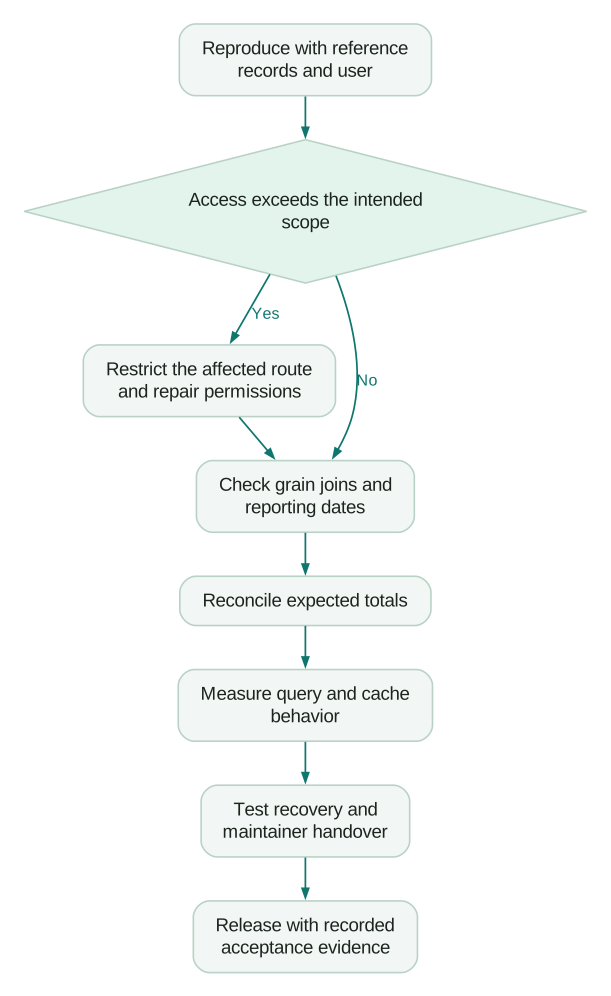
Retest the smallest failing example after each change, then the decision-critical report. Keep the expected answer stable unless the business explicitly approves a changed definition.
What should pass before handover?
- Every shared reporting dataset has a documented grain and key.
- One-to-many joins preserve the intended counts and amounts.
- Restricted accounts pass tests across all enabled access routes.
- Time-boundary records appear in the agreed reporting period.
- Cache behavior meets the report's freshness requirement.
- A second maintainer can diagnose a failure and recover the application.
- The business owner can explain the metric and act on its output.
Keep these tests with the deployment's change process. A new group, a rewritten SQL question or a changed join can invalidate an earlier sign-off even when the dashboard layout has not moved.
Questions people ask
Why does revenue increase after a join?
The join may repeat one order across several matching rows. Check the grain and count matches per business key before summing. A distinct order count can look correct while repeated amounts still inflate revenue.
Is hiding a table enough to protect it?
No. Hiding changes discovery and presentation, while access requires appropriate permissions. Test whether a user can reach the same data through other allowed routes instead of relying on its absence from a menu.
Should every slow dashboard use caching?
Choose caching according to the decision's freshness tolerance and the actual query behavior. First identify whether the delay comes from database work, many charts or another layer. A faster stale result may be unsuitable for the action the report supports.
How do we test a time-zone problem?
Use records near midnight and compare the original timestamp, conversion and grouping date. Include daylight-saving boundaries when the reporting region uses them. Agree the business time zone before deciding which output is correct.
Can we validate permissions as an administrator?
Use accounts that reproduce the intended audience's real group memberships and attributes. An administrator's broad access is not representative. Include accounts with overlapping groups because effective access can differ from a single group's settings.
Sources
- Metabase: Metadata editing and table visibility. Accessed 13 October 2026.
- Metabase: Joining data. Accessed 13 October 2026.
- Metabase: Permissions introduction. Accessed 13 October 2026.
- Metabase: Row and column security limitations. Accessed 13 October 2026.
- Metabase: Caching query results. Accessed 13 October 2026.
- Metabase: Time zones. Accessed 13 October 2026.
- Metabase: Docker and production application database. Accessed 13 October 2026.
Written by
Jafrin Akter AloData Engineer and Co-founder, martechdevs
Jafrin Akter Alo is a data engineer and co-founder of martechdevs, where the team has delivered 74+ martech, data and growth stack implementations.