
GA4 BigQuery Sessionization: Build and Validate Session Counts
Data Engineer and Co-founder, martechdevs
Last updated 9 min read
GA4 BigQuery sessionization groups exported events into sessions using a stable identity and ga_session_id, then applies an explicit reporting window. The useful result includes identifier coverage, boundary checks and reconciliation notes. Counting session_start events, counting session IDs alone or summing daily distinct counts can each answer a different question from the one your dashboard claims to answer.
Last updated: 8 October 2026.
Define the session measure before writing SQL
There are at least three reasonable measures: sessions that started during a period, sessions with any observed activity during it, and a custom grouping of events separated by a chosen inactivity gap. They are not interchangeable.
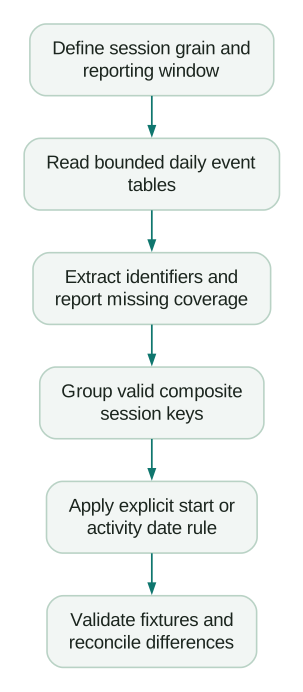
This guide builds a stream-scoped, device-based count of observed sessions whose session ID indicates a start inside the reporting period. It uses the existing GA4 session identifier. It does not recreate missing sessions, stitch people across devices or promise exact agreement with every GA4 reporting surface.
Google's session documentation explains that ga_session_id is generated from the session start timestamp in seconds. Combine it with an identity rather than treating it as globally unique. The documentation also explains that GA4's reporting session counts use estimation.
If two visitors start at the same second, their session IDs can match. Counting only distinct session IDs merges them. If one visitor has two sessions on different dates, counting only visitors merges those instead.
For a production marketing data warehouse, write the grain into the model description: “One row per web stream, pseudonymous browser identity and positive GA4 session ID observed in the selected export range.” That description gives reviewers something precise to challenge.
Choose identity deliberately
For a single web stream, user_pseudo_id plus ga_session_id is a practical starting key. The example below also includes stream_id to keep multiple streams separate. If you intentionally measure a journey across streams, decide how those streams relate before removing that scope.
Do not casually use COALESCE(user_id, user_pseudo_id) as a session identity. A visitor can sign in during a session. Earlier events would use the pseudonymous ID, while later ones would use the account ID, splitting one session into two keys. A separate identity model can solve an account-level question, but it should not be introduced as a harmless SQL convenience.
For analysis across properties, include a property identifier too. Two datasets may contain identifiers that look compatible without sharing the same collection contract. Keep the raw key fields alongside any hashed surrogate so a suspected collision is debuggable.
Null identifiers require an explicit policy. Do not turn all missing identities into unknown and then count one session per timestamp. Do not generate a random identity per event and call the result observed sessions. Exclude unkeyable events from this particular count, retain them in coverage reporting, and investigate their collection context.
Extract nested parameters without multiplying events
The BigQuery export schema stores event_params as a repeated record. Extract the session ID with a scalar subquery, rather than joining every parameter row into the main event table and accidentally expanding each event.
Google's advanced query examples demonstrate extracting ga_session_id from value.int_value and grouping it with user identity. Start with the expected schema. If your implementation produces the parameter as a string or repeats the key, investigate that mismatch instead of silently choosing an arbitrary value.
A scalar subquery with more than one matching parameter will fail. That is useful evidence of a malformed assumption. If your production pipeline intentionally resolves duplicates, document the resolution rule and count affected rows; LIMIT 1 without an ordering or quality check can conceal inconsistent data.
Also delay any UNNEST(items) until the session grain is established or the item aggregation is isolated. A purchase with four item rows is still one event. Repeating its event value after an item join can inflate revenue even when the distinct session count remains correct.
Use a bounded query with an explicit start-date convention
The following GoogleSQL template uses daily web-export tables and counts sessions starting from 1–7 October 2026 in the Asia/Dhaka timezone. Replace the project, dataset, stream ID, dates and timezone. The scan includes surrounding dates to inspect boundary events; it does not guarantee complete event history for arbitrarily long sessions.
DECLARE report_start DATE DEFAULT DATE '2026-10-01';
DECLARE report_end DATE DEFAULT DATE '2026-10-07';
DECLARE reporting_tz STRING DEFAULT 'Asia/Dhaka';

WITH extracted AS (
  SELECT
    stream_id,
    user_pseudo_id,
    event_name,
    event_timestamp,
    (
      SELECT value.int_value
      FROM UNNEST(event_params)
      WHERE key = 'ga_session_id'
    ) AS session_id
  FROM `YOUR_PROJECT.analytics_PROPERTY_ID.events_*`
  WHERE _TABLE_SUFFIX BETWEEN '20260930' AND '20261009'
    AND platform = 'WEB'
    AND stream_id = 'YOUR_WEB_STREAM_ID'
), keyed AS (
  SELECT *
  FROM extracted
  WHERE NULLIF(user_pseudo_id, '') IS NOT NULL
    AND session_id BETWEEN 1 AND 253402300799
), sessions AS (
  SELECT
    stream_id,
    user_pseudo_id,
    session_id,
    MIN(event_timestamp) AS first_observed_event_us,
    MAX(event_timestamp) AS last_observed_event_us,
    COUNT(*) AS observed_events,
    COUNTIF(event_name = 'session_start') AS start_events
  FROM keyed
  GROUP BY stream_id, user_pseudo_id, session_id
), dated AS (
  SELECT
    *,
    DATE(TIMESTAMP_SECONDS(session_id), reporting_tz)
      AS session_start_date
  FROM sessions
)
SELECT
  session_start_date,
  COUNT(*) AS observed_sessions_started,
  COUNTIF(start_events = 0) AS sessions_without_start_event,
  COUNTIF(start_events > 1) AS sessions_with_repeated_start_events,
  SUM(observed_events) AS events_in_scanned_session_rows
FROM dated
WHERE session_start_date BETWEEN report_start AND report_end
GROUP BY session_start_date
ORDER BY session_start_date;
The upper bound prevents an out-of-range timestamp conversion. It is not a sufficient data quality rule: a technically valid session ID from an implausible year still needs investigation. Add a business-appropriate plausibility check and report exclusions before operationalizing the model.
The first_observed_event_us and last_observed_event_us names are intentional. They describe the scanned export, not guaranteed session start and end times. A sparse or truncated event sequence cannot establish the full duration of a visit.
This query preserves each session as a multi-column group rather than concatenating ambiguous strings. It also avoids mixing daily and intraday tables: the numeric _TABLE_SUFFIX range excludes intraday_... names. Google's wildcard table documentation explains suffix filtering and scan selection.
Before execution, use BigQuery's query validation, dry-run estimates and cost controls. A SQL LIMIT is not a substitute for restricting the scanned tables. The template has not been run against your property; confirm schema and expected bytes in your environment.
Publish a coverage measure beside the count
Run a quality summary from the extracted stage before filtering into keyed. Count total events, missing or blank pseudonymous IDs, missing session IDs, invalid numeric ranges and events with both required identifiers. Group the exclusions by event name and collection source where you have a trustworthy source marker.
Use a consistent denominator. “98% session coverage” is misleading if it actually means 98% of events have identifiers. Call it event key coverage. One missing-ID event does not necessarily equal one missing session.
For example, suppose 10,000 exported web events include 400 without a pseudonymous ID and 250 without a session ID, with 150 missing both. The union of excluded events is 400 + 250 − 150 = 500, so 9,500 events are keyable: 95% event key coverage. Adding the two missing counts without considering their overlap would incorrectly report 93.5% coverage.
Do not use the coverage rate to inflate sessions mechanically. Missingness can be concentrated in specific event types, devices, consent states or server integrations. An unkeyable refund event and an unkeyable landing-page view do not imply the same missing journey.
If server events are the source of the gap, review the Measurement Protocol context requirements. If identities reset between domains, investigate GA4 cross-domain tracking before attempting a warehouse repair.
Validate with a deliberately awkward fixture
Use a small synthetic dataset whose correct outcome can be explained without the query. Include these six cases:
- Browser A starts a session at 23:58 on 30 September and continues at 00:03 on 1 October with the same ID.
- Browsers B and C both start at 09:00 on 1 October, producing the same numeric session ID but different identities.
- Browser D has a keyed event on 2 October without an observed
session_start. - Browser E has two
session_startevents with the same session key on 3 October. - Browser F has a new session on 8 October.
- Two additional events lack the identifiers needed to form a key.
For the 1–7 October start-date definition, expect four sessions: B, C, D and E. A began before the interval; F began after it. D remains a session in this model despite the missing start event. E remains one session despite two start events. The unkeyable events belong in coverage, not in a guessed session bucket.
For an “any activity on 1 October” definition, A would be included. That difference is a specification decision, not automatically a defect.
Also create a same-session journey crossing midnight inside the reporting interval. A daily activity-based distinct count can include it on both dates; summing those rows overstates unique sessions across the whole interval. Either allocate it once by start date, as above, or compute a distinct union for the whole activity window. Label the chosen measure clearly.
Treat time boundaries and late data as model inputs
Daily export tables can be updated for late arrivals. Google's export schema describes updates for up to three days after the event date. Rebuild the relevant recent partitions and their dependent session aggregates instead of assuming yesterday's session table is final forever.
A session model can span source partitions. If a late event belongs to a session whose start date is earlier than your daily refresh window, updating only the event-day aggregate may leave the session row stale. Keep affected session keys and rebuild those groups, or use a documented lookback strategy whose limitations are visible.
For very long sessions, a fixed one-day boundary buffer is not a universal solution. Monitor the distribution of observed session spans and choose a scan or incremental design that supports your actual use case. Counts of started sessions need less complete history than reliable duration, landing-page or purchase-per-session calculations.
When someone asks for “session duration,” clarify whether they want observed event span, recorded engagement time or another measure. Taking maximum minus minimum timestamp creates an event-span metric, with zero for a one-event session. It is not automatically GA4 engagement time.
Explain differences from GA4 before changing the query
Google's UI-versus-export explanation identifies estimation, modeling, timezones, filters and export scope as reasons for differences. Use that as a diagnostic framework, while checking current schema rather than assuming every historical limitation still applies.
First compare the same property, stream, timezone, date range and data maturity. Then compare definition and identity. Finally examine collection coverage, export filtering and reporting features. A two-percent difference is not proof of correctness, and a larger difference is not proof that the UI is wrong.
Keep attribution separate from session counting. A model can count sessions correctly while assigning the wrong acquisition source. Current export schema includes session traffic-source fields where available; use an explicit attribution specification instead of grabbing the first non-null UTM parameter and presenting it as GA4's result.
Release the model with evidence
- Two different identities with the same session ID remain separate sessions.
- Signing in does not split the pseudonymous session key.
- The midnight fixture matches the documented date convention.
- Missing identifiers remain visible in event coverage and are not fabricated.
- Duplicate start events do not inflate the grouped session count.
- Daily and intraday data cannot overlap in the same input window.
- Late-arriving events trigger the required session-row refresh.
- Cost estimates, exclusions and differences from the GA4 report are documented.
Start with this small, auditable session model before adding landing pages, channels, conversions and revenue. The GA4 BigQuery export guide covers the collection foundation; this model should make its assumptions easier to see, not hide them behind a larger dashboard.
Questions people ask
Is `ga_session_id` unique on its own?
No. It is based on a session start timestamp, so different identities can share the same value. Combine it with a stable identity and the property or stream scope your model requires.
Should I count only `session_start` events?
That gives a start-event count, which can differ from grouped observed sessions when start events are missing or repeated. Keep both as diagnostic measures and choose the one that matches the reporting definition.
Do GA4 sessions reset at midnight?
A session can cross midnight. Avoid importing a daily-reset assumption into your warehouse model, and distinguish sessions starting on a date from sessions active on it.
Can I replace missing session IDs with a 30-minute inactivity rule?
You can build a separately named inferred-session model if it supports a real decision. It is not a recovery of the original GA4 session identity, and its coverage, inactivity threshold and privacy constraints need their own documentation.
Why does BigQuery disagree with the GA4 interface?
Check scope, timezone, identity, definition, data maturity and missing identifiers first. Estimation and reporting features can also create legitimate differences, so exact equality is not a sufficient acceptance criterion.
Sources
- Google: About Analytics sessions. Accessed 8 October 2026.
- Google: BigQuery export schema. Accessed 8 October 2026.
- Google: Advanced BigQuery queries. Accessed 8 October 2026.
- Google Cloud: Query wildcard tables. Accessed 8 October 2026.
- Google Cloud: Estimate and control query costs. Accessed 8 October 2026.
- Google: Bridge the gap between the Analytics UI and BigQuery export. Accessed 8 October 2026.
Written by
Jafrin Akter AloData Engineer and Co-founder, martechdevs
Jafrin Akter Alo is a data engineer and co-founder of martechdevs, where the team has delivered 74+ martech, data and growth stack implementations.