
Clay Alternatives: Choose Around Your Enrichment Workflow
Data Engineer and Co-founder, martechdevs
Published 9 min read
The right Clay alternative depends on which part of your workflow needs replacing. Apollo can suit standard prospecting and CRM enrichment, FullEnrich can address contact-data gaps, HubSpot can enrich records inside an existing CRM, and n8n can orchestrate custom APIs. Compare the accepted records each workflow produces, its operating cost and the work your team must maintain before choosing a replacement.
Last updated: 14 September 2026.
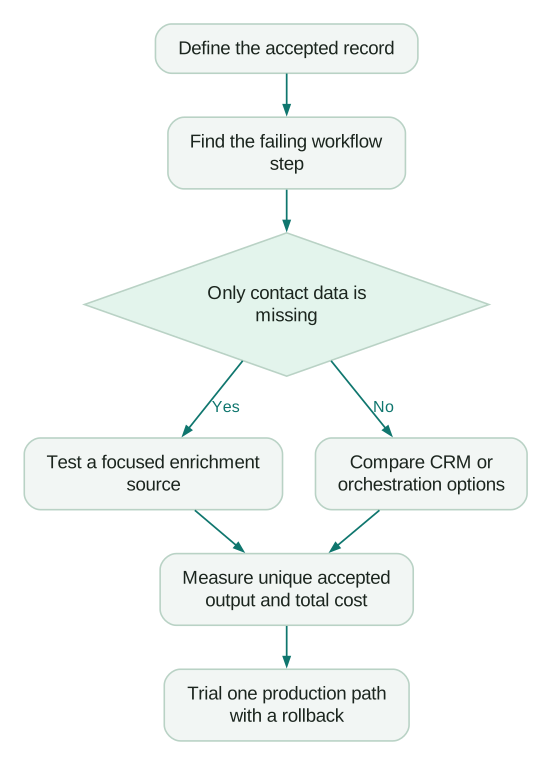
A Clay table can contain five different jobs: identifying accounts, researching fit, finding people, obtaining contact details and updating a destination. Moving all five because one is expensive can create a larger problem than the one you are trying to solve.
Start by identifying the expensive or unreliable step. If the table returns accurate research but too few usable phone numbers, test another data source. If the research is fine but CRM records duplicate, fix identity and write rules. If nobody can understand or maintain the workflow, a simpler architecture may be worth more than additional coverage.
This guide compares practical replacement patterns, rather than ranking products on claims about the size of their databases. Product capabilities below come from current vendor documentation; the evaluation method and examples are recommendations, not hands-on vendor benchmarks.
What are you actually replacing?
Write a one-sentence contract for the workflow: “For an approved account domain, produce one current contact in an eligible role, evidence of fit, a usable work email and the matching CRM record ID.” That sentence exposes the requirements a cheaper subscription might leave uncovered.
Then separate the outputs. A contact lookup returns identity and contact data. Research provides evidence for a business judgment. Orchestration decides which step runs next. CRM synchronization reconciles the result with an existing record. Each can fail independently.
Clay currently distinguishes platform Actions from Data Credits used for marketplace data and AI. Bringing your own provider key can change the data charge while platform usage and external-provider bills still remain. Treat those as separate lines in your baseline. Clay's usage model explains the distinction.
If the main challenge is coordinating those parts, our GTM engineering work starts with the workflow contract and ownership rules. Buying another database before defining the output usually makes the comparison harder.
Use the Clay pricing guide to understand the present bill, then answer four questions:
- Which outputs are required by the next person or system?
- Which steps account for most expense and manual repair?
- Which requirements are occasional exceptions rather than everyday work?
- Who will own the replacement when a provider changes its API or data?
When does Apollo make sense?
Consider Apollo when the core requirement is standard prospecting data connected to a sales workflow, especially when the team already uses it. A single familiar environment can be easier to operate than several independent tables and exports.
Apollo documents manual, real-time and scheduled CRM enrichment for Salesforce and HubSpot. Field mapping distinguishes filling empty fields from overwriting existing values. Its documentation also distinguishes CRM polling from the subsequent enrichment push, so “real-time” should not be interpreted as zero delay from every CRM change. Apollo CRM enrichment documentation.
For your evaluation, choose records representing actual selling conditions: your countries, company sizes, job families and CRM quality. A system that works well for US technology executives may produce a different result for local operations managers elsewhere. A global coverage claim cannot settle that question.
Keep custom research separate in the trial. “Find a current finance leader” and “determine whether this company sells through distributors in three countries” require different evidence. Accepting the first result should not imply the second capability exists.
Apollo is worth testing when reducing handoffs is a priority. It is less compelling as a complete replacement when the value of your Clay workflow comes from unusual research logic and multiple external sources. Our Clay versus Apollo comparison explores that broader tradeoff.
When is a focused enrichment service enough?
If the approved account and person are already known, you may only need missing contact information. In that case, replacing the research workspace can be unnecessary.
FullEnrich documents APIs for contact enrichment, reverse email lookup and contact or company search. Its integration options include Clay and n8n, which makes it possible to use the service as a component inside a workflow as well as in a replacement architecture. FullEnrich API overview.
The useful test is whether it resolves the gaps your present provider leaves. Measure incremental accepted results, rather than total returned fields. If two providers find nearly the same people, adding both may produce little additional value.
Define “accepted” before testing. For a work-email workflow, it could require the right person, current employer, eligible role, accepted verification status and a record that is not suppressed. A populated email cell alone does not meet that definition.
Also decide where unresolved cases go. Returning a blank with a clear reason can be more useful than guessing an address. Your replacement needs a recognizable outcome for “person identified, contact unavailable” so that later steps do not mistake it for a complete record.
Can HubSpot cover the requirement you already have?
Check existing CRM capabilities before adding another subscription. If the objective is to populate standard contact and company properties in HubSpot, native enrichment deserves a trial alongside external options.
HubSpot's current documentation says standard data enrichment does not consume HubSpot Credits, while smart properties do. Availability depends on the subscription and feature. Contact enrichment uses identifying information including a work email; this is different from assuming the feature will discover an unknown person's address. Automatic enrichment also requires configuration. HubSpot data enrichment documentation.
Test the properties that affect your operations. Filling company size is useful if routing depends on size. It is less valuable if the sales process actually depends on whether a company operates a marketplace, a fact your chosen enrichment path cannot establish.
Keep existing first-party information authoritative where appropriate. If a customer explicitly told you their operating region, an external estimate should not silently replace it. Write proposed enrichment into a separate property during evaluation, compare differences, and establish the production rule deliberately.
Native enrichment can reduce moving parts. The tradeoff is whether its supported properties and matching requirements cover your real use case. Do not expand a simple data-cleanup requirement into an entirely new prospecting system without a reason.
When should you build with n8n and APIs?
n8n is an orchestration option when the team needs custom branching, destination logic or provider combinations and has someone able to maintain them. Its HTTP Request node can call REST APIs using configured credentials. That provides a building block; it does not supply every data provider or define your business rules. n8n HTTP Request documentation.
Budget for the entire operating system around the workflow: API subscriptions, execution infrastructure, credentials, error handling, monitoring and changes. n8n's hosting documentation separately covers the responsibilities involved in running your own instance. A self-hosted deployment still needs an owner. n8n hosting documentation.
For example, a custom flow might search existing CRM records, request a missing field from a provider, wait for an asynchronous result and then update the original record. Each transition needs a stable identifier. If the external request finishes after a timeout, a retry should reconcile that result before buying the same enrichment again.
Choose this pattern when custom control solves a persistent requirement. If a nontechnical operator must frequently redesign the research process, the engineering dependency may outweigh a lower software bill. Evaluate who can safely change the workflow, not just who can build its first version.
How do you compare coverage without fooling yourself?
Use a frozen, representative sample and evaluate all candidates against the same acceptance rules. Preserve the input version and run dates, because contacts change employers and providers refresh at different times.
Here is an illustrative comparison, not a claim about any named vendor. Your sample contains 1,000 eligible people. Provider A yields 650 accepted records. Provider B yields 700. They overlap on 600 people.
Replacing A with B increases accepted coverage by 50 records. Combining their accepted results produces 750 unique records: 650 plus 700 minus 600. B adds 100 records that A missed, while A contributes 50 that B missed.
Those are three different decisions. If B replaces A, compare its total operating cost and the loss of A's 50 unique records. If B supplements A, compare the cost of finding the 100 incremental records. If a waterfall calls B only after A fails, rerun that actual configuration because the bill and request population may differ from the full-sample trial.
Suppose the incremental workflow costs an illustrative $120 and produces those 100 newly accepted records. The marginal cost is $1.20 per incremental accepted record. Dividing $120 by B's 700 total results would hide the duplication and produce an irrelevant figure for this decision.
Break the results down by segment. A small increase concentrated in your highest-value region can matter more than a larger increase outside your target market. Review disagreements manually before declaring either provider correct.
What does switching really cost?
Calculate a monthly baseline that includes subscriptions, provider usage, operator time and repair work. Add one-time migration cost separately. Use observed workload rather than assuming every available credit will produce a usable record.
An illustrative migration costs $2,400 to rebuild mappings, validate results and train the operator. The new subscription saves $200 per month. Ignoring maintenance, payback is 12 months. If the new workflow requires an additional $100 of monthly maintenance, net savings fall to $100 and payback becomes 24 months.
That calculation does not prove the switch is bad. Faster turnaround or better accepted coverage may justify it. It does show why a cheaper monthly plan can be an expensive migration when the present workflow already works.
Include the exit conditions in the trial. Can you export accepted records, identifiers, source timestamps and your own research? Can you reproduce the qualification logic elsewhere? A replacement that hides essential evidence makes the next migration harder.
When the current problem is broad autoruns, duplicate research or careless CRM writes, first address the common Clay implementation mistakes. You need a functioning baseline to compare alternatives fairly.
How do you migrate without corrupting the destination?
Run the candidate against a copy of the input and write proposed output to a review location first. Keep the live CRM writer unchanged during this comparison. Two systems independently overwriting the same field make it difficult to attribute errors.
Review new values, deletions, changed employer matches and records with conflicting evidence. Then move one defined workflow or segment, with a clear timestamp separating the old and new process.
Checklist
- Preserve existing CRM IDs and distinguish a changed employer from a duplicate person.
- Carry suppression and exclusion rules into the replacement before activating downstream work.
- Define which fields may be filled, replaced or proposed for review.
- Reconcile delayed responses before retrying paid enrichment.
- Compare accepted output, operator time and actual usage for the same workload.
- Record how to pause the new writer and restore the previous workflow.
The right outcome may be a smaller Clay workflow, one additional provider or a complete replacement. Choose the architecture that produces trustworthy records with a maintenance burden your team can sustain.
Questions people ask
What is the best Clay alternative?
There is no single replacement for every Clay workflow. Select around the failing step, then test the actual output and operating cost on your own records.
Can I use an enrichment provider without replacing Clay?
Yes, a provider can be a component of the existing workflow when a suitable integration is available. That can solve a coverage gap while preserving research logic and destination rules that already work.
Is a custom n8n workflow always cheaper?
Its total cost depends on provider usage, infrastructure and ongoing maintenance. Include the person responsible for failures and API changes before comparing it with a managed workspace.
Should I compare tools by email find rate?
Find rate is useful only when the definition and sample are consistent. Evaluate correct identity, current employer, verification requirements, suppression and incremental coverage as well as whether an address was returned.
How much of the workflow should move first?
Start with one bounded process or segment whose output you can compare with the current system. Expand after you understand disagreements, actual costs and the consequences of retries or delayed results.
Sources
- Clay Actions and Data Credits, accessed 14 September 2026.
- Apollo CRM enrichment, accessed 14 September 2026.
- FullEnrich API overview, accessed 14 September 2026.
- HubSpot data enrichment, accessed 14 September 2026.
- n8n HTTP Request, accessed 14 September 2026.
- n8n hosting, accessed 14 September 2026.
Written by
Jafrin Akter AloData Engineer and Co-founder, martechdevs
Jafrin Akter Alo is a data engineer and co-founder of martechdevs, where the team has delivered 74+ martech, data and growth stack implementations.