
Apollo Pricing: Seats, Credits and the Workflow Behind the Bill
Data Engineer and Co-founder, martechdevs
Last updated 9 min read
Apollo pricing combines a seat subscription with credits consumed by data and other activities. Basic starts at $49 per seat per month on annual billing, and Professional at $79, but those figures do not describe the whole operating cost. Budget for the exact enrichment workflow, billing commitment, add-ons and the proportion of purchased data your sales team can actually use.
Last updated: 8 September 2026.
The difficult budgeting question is how many useful, current, eligible contacts your process produces from its allowance. A credit is a billing unit. It is not a promise of a qualified lead, a delivered email or a sales opportunity.
This guide uses Apollo's live pricing controls and official billing documentation checked on the date above. Some public explanations conflict, so the distinctions below matter. Confirm the final configuration in your account before purchasing, particularly if you have a legacy or negotiated plan.
What are the current seat prices?
The public pricing cards show these USD rates, excluding applicable taxes:
- Free: $0, with 75 credits monthly.
- Basic: $65 monthly, or $49 per month billed annually; 2,500 monthly credits or 30,000 granted upfront annually.
- Professional: $99 monthly, or $79 per month billed annually; 4,000 monthly credits or 48,000 granted upfront annually.
- Organization: $119 per month billed annually, with a three-seat minimum and 72,000 annual credits per seat.
The monthly toggle also displays $149 for Organization while labeling it “Annual Only.” Do not interpret that display as a confirmed monthly contract. Apollo pricing.
Record both the payment due and the effective monthly price in your budget. A discounted monthly equivalent can conceal a larger immediate cash commitment. A founder testing a new outbound motion and an established team renewing a proven workflow have different reasons to choose annual billing.
Our GTM engineering service helps define the workload before selecting the software configuration. That work can reveal whether the actual bottleneck is data access, account selection, CRM ownership or follow-up capacity.
How should you translate seats into a usable budget?
List the people who need to operate the system and the features each needs. Do not assume everyone who receives a report needs the same operational access as the person building workflows. Confirm the licensing arrangement with the vendor rather than sharing credentials to reduce the seat count.
For illustration, three Professional seats on the displayed annual rate cost $2,844 per year before extras, equivalent to $237 per month. Monthly billing for the same three seats is $297 per month, or $3,564 over twelve months if the price stays unchanged. The $720 difference purchases a longer commitment.
Use that comparison alongside uncertainty. If the team has not established its target market, contact acceptance rate or daily operating process, the ability to change direction may be more useful than the discount. Once the workflow is stable, annual capacity can be easier to plan.
Avoid dividing subscription cost by the maximum possible allowance and calling the result your cost per lead. That calculation assumes complete utilization, a uniform charging unit and perfect output quality. None follows automatically from buying a seat.
The Clay versus Apollo guide helps decide whether the workflow belongs primarily in a sales workspace or needs a broader research and orchestration layer.
Which activities consume credits?
Apollo's current usage documentation separates email and phone access, enrichment, AI research, email infrastructure and other activities. Exports may consume credits on certain plans or legacy configurations. The usage view can attribute charges to features, users and surfaces such as the web application, automation or API. Review credit usage.
Build your estimate from actions rather than from the number of rows in a CSV. A single prospect might require finding an email, checking a phone number, refreshing an employer and researching an account. Another might already exist with complete data and need none of those steps.
For each activity, record four things: the eligible population, the frequency, the configured charging rule and the accepted output. Keep repeated refreshes separate from first-time access so a maintenance job does not disappear inside your acquisition forecast.
Also separate paid access from an operational action. Looking at a list, requesting additional data, creating a CRM record and enrolling someone into outreach are different events. A volume estimate becomes unreliable when the team describes all of them as “adding a lead.”
If you use multiple interfaces, allocate usage to the workflow that caused it. An API job and a rep working in the interface may draw on the same commercial allowance while appearing in different activity reports. Your budget should reflect their combined demand.
Why can waterfall enrichment cost more than expected?
Apollo's waterfall documentation describes a configured sequence of sources and an optional validator. Multiple sources can return data and charge credits during one run; validation can charge separately. With validation configured, the process can continue beyond the first returned result. Waterfall enrichment overview.
This means “one contact enriched” is an output count, not a reliable description of the number of billable operations. Evaluate the configured source order and the quality rule that ends the search.
Suppose an illustrative workflow checks 100 approved contacts. Sixty return accepted results through the first source. Of the remaining 40, twenty produce a result at the second stage, but only fifteen meet your acceptance criteria. Five continue alongside the twenty unresolved contacts.
The operator sees 75 accepted records so far. The billing history may contain successful source returns, validation activity and later attempts that do not map one-to-one to those 75 records. Reconcile the run before assuming a fixed credit cost per accepted contact.
There is also a documentation caveat. The waterfall overview emphasizes charges for returned data, while the API pricing reference says some vendor configurations can charge per lookup even when no data is found. For API workflows, confirm the selected provider's rule and use the actual usage record. Do not apply a universal “no result, no charge” assumption. Apollo API pricing.
A broader waterfall can be worthwhile when it adds useful contacts. Measure its incremental accepted output against its incremental expense. A high fill rate dominated by stale roles or irrelevant accounts does not improve the business case.
How do you estimate API costs and capacity?
Apollo's API pricing reference lists endpoint-specific charging units. People enrichment can cost one to nine credits under its documented base conditions, with additional differences for waterfall configurations. Other endpoints charge per organization, page or eligible result. Use the endpoint involved in your integration instead of transferring a web-interface assumption to API work. API pricing and credits.
Capacity is a separate constraint. Apollo documents API limits by team and endpoint, across applicable time windows. Some endpoint categories have different limits from the general plan limits, and legacy workspaces can differ. Apollo API rate limits.
If an overnight job has enough credits but keeps receiving rate-limit responses, buying more credits will not necessarily finish it faster. Inspect the relevant limit, reduce concurrency and respect the retry interval. Conversely, a high permitted request rate does not supply the credits needed to buy all the returned data.
For a repeatable integration, keep a ledger containing the input record ID, operation, request time, completion status, returned fields and recorded usage. If a request times out, first determine whether it completed before retrying. Otherwise, both the cost estimate and destination data can become difficult to reconcile.
Do not request phone data, additional attributes or AI research by default simply because the API makes it possible. Request what the next step requires. This makes the workflow cheaper to understand as well as potentially cheaper to operate.
What does a useful monthly forecast look like?
Build low, expected and high scenarios from a small representative run. The following example uses invented workload and credit-consumption assumptions to explain the method. It is not an Apollo rate card or a prediction for your account.
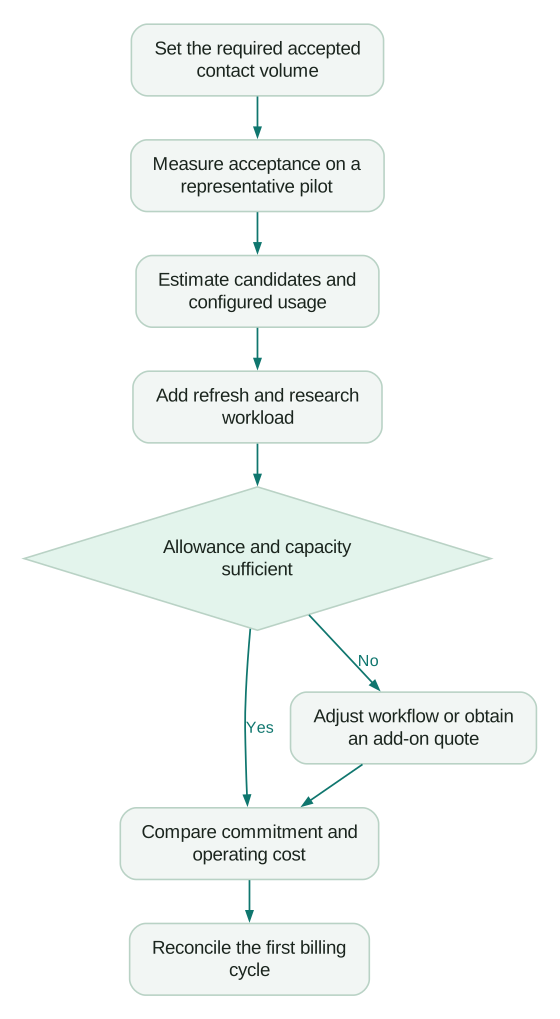
Assume the team wants 1,200 accepted contacts each month. In a pilot, 80% of candidate records satisfy the team's requirements after enrichment, so the forecast begins with 1,500 candidates. Assume the observed blended charge is four credits per candidate for the selected process. The baseline is 6,000 credits.
Add an assumed 600 credits for planned refreshes and 400 for approved additional research. Expected demand becomes 7,000 credits. If the blended enrichment cost rises to six because more records reach later sources, demand becomes 10,000 credits: 1,500 times six, plus the same 1,000 of other activity.
The forecast is sensitive to both acceptance and metering. If acceptance falls to 60%, you need 2,000 candidates to reach the same 1,200 output target. At four credits each, plus the other activity, demand becomes 9,000 credits.
These scenarios reveal what to investigate. A coverage problem changes the candidate requirement. An expensive provider mix changes cost per candidate. Additional seats do not repair either by themselves.
Keep the financial view separate from this credit forecast. Add the actual subscription, confirmed top-up price, purchased infrastructure and operator cost. Then calculate cost per accepted record and, later, cost per accepted opportunity using your CRM's definitions.
What should you check about add-ons and renewal?
Apollo's plan-management documentation says add-on credits renew with the subscription, unused credits expire at the end of the billing cycle, and reducing or removing add-ons takes effect at the next cycle. A temporary usage increase can therefore create a recurring purchase unless someone manages it. Manage an Apollo plan.
Ask for the exact billing period, expiry date and renewal behavior of every add-on in the proposed configuration. Check whether a displayed feature is included, usage-metered, separately subscribed or introductory. A product menu showing an option does not tell you which commercial rule applies.
Assign one owner to reconcile the first complete cycle. They should compare the forecast with actual charges and explain the largest differences. Do that before scaling the same process to every rep or territory.
Checklist
- Record seat count, billing term, immediate payment and renewal date.
- Verify credit allowance and grant timing in the selected configuration.
- Identify source and validator charges for the actual enrichment path.
- Confirm API entitlement and endpoint capacity if an integration depends on them.
- Separate recurring add-ons from temporary operating assumptions.
- Measure accepted records and downstream outcomes alongside consumption.
If waste comes from duplicate records, conflicting ownership or repeated enrichment, address the Apollo implementation mistakes before upgrading. If the required workflow remains a poor fit, compare Apollo alternatives by data, engagement and CRM needs separately.
Questions people ask
Does Apollo offer unlimited data?
Do not interpret a broad unlimited claim as unlimited activity across the platform. Match the specific feature, selected plan and configured data request to its documented credit rules and actual account allowance.
Are annual credits the same as monthly credits?
Grant timing and expiry affect how much capacity is available at a particular moment. Check the chosen billing configuration, then set an internal consumption budget even when a larger allowance is available upfront.
Is one enriched contact always one credit?
No universal conversion applies across all enrichment operations. The requested data, selected sources, validation and interface can change how the activity is charged.
Should I upgrade when the team runs out of credits?
First identify the workflow and users responsible for the change. An upgrade can be appropriate for useful demand, while duplicate requests or unnecessary fields should be corrected at the source.
What is the best metric for comparing the cost with another tool?
Compare total operating cost per accepted output using the same records and acceptance criteria. Include maintenance and handoffs, then connect the output to sales outcomes once enough time has passed to evaluate them.
Sources
- Apollo pricing and live billing controls, accessed 8 September 2026.
- Review credit usage in Apollo, accessed 8 September 2026.
- Apollo waterfall enrichment overview, accessed 8 September 2026.
- Apollo API pricing and credits, accessed 8 September 2026.
- Apollo API rate limits, accessed 8 September 2026.
- Customize and manage an Apollo plan, accessed 8 September 2026.
Written by
Jafrin Akter AloData Engineer and Co-founder, martechdevs
Jafrin Akter Alo is a data engineer and co-founder of martechdevs, where the team has delivered 74+ martech, data and growth stack implementations.