
Apollo Implementation Mistakes: Ownership, Sequences and CRM Sync
Data Engineer and Co-founder, martechdevs
Last updated 9 min read
Apollo implementation problems usually start at the boundaries between prospecting, record ownership, CRM synchronization and sequence eligibility. Fix them by defining one identity rule, explicit field-writing permissions and a clear handoff after a reply. Test imports, API writes and automated sync separately because they can apply different behavior, even when they appear to update the same contact.
Last updated: 8 September 2026.
A contact can look correct in Apollo and still be wrong operationally. It may belong to the wrong rep in Salesforce, point to an outdated employer, qualify for a sequence despite an active opportunity, or lack the CRM record required to log its activity.
The solution starts with a small set of realistic records and an agreed expected result for each. A connection showing “active” only tells you the integration is connected. It does not prove the business process works.
This guide uses current Apollo documentation to identify the product behaviors that deserve attention. The proposed tests are a practical implementation method, not a claim that we have inspected your workspace.
1. Choosing the wrong integration mode
For HubSpot, Apollo distinguishes the full HubSpot CRM integration from HubSpot Data Enrichment. The latter enriches existing records without providing the full record and activity synchronization of the CRM integration. Choosing enrichment-only and expecting emails, deals and new contacts to appear in HubSpot creates a predictable mismatch. Apollo's HubSpot integration overview.
Write the required direction beside every object before connecting. For example: pull customer status into Apollo, push accepted new contacts into the CRM, and log sales activity against those records. If the selected mode cannot do that work, changing field mappings will not solve the problem.
Separate the systems' responsibilities as well. Decide where sales ownership, lifecycle stage, suppression and opportunity status are authoritative. An external research source can propose company attributes, while the CRM remains responsible for the commercial relationship.
This is the starting point for our Martech integration work: specifying the business result and data ownership before enabling automation. It prevents a technically successful connection from generating operational confusion.
2. Treating the record creator as the sales owner
Apollo's Salesforce documentation distinguishes Created By from Owner. New managed-package connections normally use a dedicated integration user's team connection, and new records can initially be owned by that integration user. Existing Salesforce owners remain unchanged on updates. HubSpot ownership depends on the pushing user's personal connection or the team's available credentials. Apollo ownership documentation.
The consequence is straightforward: a report grouped by the creator can show an integration account doing all the prospecting. A routing rule based on that field can assign work incorrectly. Use the intended sales-owner field and verify the final destination value.
Test at least three paths: an existing CRM contact, a new contact created by a rep, and a new contact created by a team automation. Record the owner before and after each operation. If a later workflow changes ownership, include that step in the test rather than checking only the immediate response.
Define what happens when the expected rep has left, is unavailable or lacks the relevant destination account. Put the record into an accountable fallback queue. A blank owner should not silently become “someone will notice.” Our lead-routing guide explains how to make those fallback decisions explicit.
3. Assuming CSV import settings cannot affect existing records
Apollo's contact import settings include whether to update matching contacts, how to handle missing owners and whether to update existing ownership. The option to create and update CRM records can override the integration's configured push settings. Review those choices for each import rather than assuming the integration's normal filters apply. Apollo CSV import documentation.
An import should have a purpose, owner and identifiable batch name. Preserve the input file and the values that matter before the operation. If a record already exists, you need to know whether the import is filling a missing attribute, correcting a known error or proposing a change.
Be especially careful with a file prepared by another team. A column labeled “owner” may mean the person who researched the account rather than the assigned seller. A stage named “new” may describe the export batch rather than the customer's actual relationship with your company.
Start with a small sample containing both new and existing records. Verify the resulting destination values before importing the complete file. A clean CSV format does not resolve a disagreement about what a field means.
Reconcile the operation instead of expecting one new record per row
Consider an illustrative batch of 1,000 input rows. Your reconciliation shows 600 new contact IDs, 300 matches to existing IDs and 100 unresolved or rejected rows. The database should grow by 600 contacts if no other changes occurred during that interval.
The 300 matched records still require review. If 80 already had a sales owner and the import changed 20 unexpectedly, the operation has an ownership problem even though the total contact count looks reasonable. Investigate the import settings and downstream routing before repeating it.
Track counts that sum to the input: created, matched or updated, intentionally skipped, and unresolved. Use your own reconciliation ledger where the platform's reporting does not expose enough detail. Do not assume missing growth means missing data, or delete all imported contacts to correct a mapping error when some were pre-existing records.
4. Treating API deduplication as a harmless switch
Apollo's single-contact creation endpoint does not deduplicate by default. Setting run_dedupe to true can match an existing contact and update it with the values supplied. Omitted fields remain, while empty values can clear fields. Matching can use identifiers or name and company, rather than only the submitted email. Create a contact API reference.
That behavior deserves a deliberate write contract. A middleware job should not send every field from a partially populated spreadsheet merely because the endpoint accepts them. Send only the fields you intend to own or change, and retain the returned contact ID.
The same reference warns that changing an email through a match can leave an email status associated with the previous address. Treat a changed address as requiring its own verification decision; do not infer that a stored status proves the new address was checked.
For a known record, prefer an explicit update using its ID and a controlled set of fields. For an uncertain match, hold the change for reconciliation. A successful HTTP response proves the request was processed, but it does not establish that a new person was created or that the intended person was matched.
Test a timeout too. If a response is lost after the write completes, the retry should locate or reconcile the original result. Otherwise, an integration that works perfectly during a demo can create duplicate records under ordinary network failures.
5. Mapping stages by their names alone
Stage mapping translates business meaning. Two fields with similar labels can represent different dimensions: contact engagement, account relationship, opportunity progression or marketing lifecycle.
Write the meaning of each important stage in a sentence. “Interested” might mean a person replied positively, while “qualified” might require an accepted business problem, appropriate company fit and a named next step. Do not equate them simply because both sound promising.
Define allowed transitions and their authority. A new imported list should not downgrade an active customer to a prospect. A positive reply should not automatically mark an opportunity as qualified unless your process defines that outcome and verifies it.
For each transition, record the triggering evidence, destination value and fields that must remain unchanged. Include reverse transitions, such as an opportunity closing or a person changing employer. Those are often the cases a happy-path implementation misses.
Maintain a small mapping specification the sales and operations teams can both read. If only the person who built the integration understands why a value changes, the system will become difficult to maintain when the process evolves.
6. Checking enrollment rules but forgetting stop rules
Apollo's sequence rules support contact and account-stage exclusions, reply handling, out-of-office pauses and behavior when another person at the account replies. Some protection triggers, including unsubscribe completion, are fixed. Reusable ruleset availability depends on the plan. Sequence ruleset documentation.
Choose the business behavior before changing a rule. If a buyer replies and introduces a colleague, the account may need a coordinated handoff rather than several independent sequences continuing. If someone is out of office, an ordinary absence should not be counted as interest or an objection.
Use test inboxes and controlled records to exercise the sequence. Test an ordinary reply, unsubscribe, out-of-office response, booked meeting and account-level reply. Check both the current sequence state and any queued work. The intended result should be visible to the rep responsible for the relationship.
Also inspect the eligibility decision immediately before enrollment. A contact list created on Monday can be stale by Thursday if the account has since become an active opportunity. Store the list's origin, but use current relationship data when deciding whether outreach is appropriate.
Do not remove protective exclusions just to increase the number enrolled. Investigate why legitimate prospects were excluded, and correct the classification or mapping if it is wrong.
7. Expecting every CRM change to appear immediately
Apollo's HubSpot overview describes recurring synchronization and notes that larger jobs and activities can take longer. Activity sync also depends on the associated record existing in HubSpot and on the relevant activity settings being enabled. HubSpot sync behavior.
Separate a delay from a permanent rejection. For a missing activity, first verify the related record and mapping, then inspect the sync status or error. Recreating the contact immediately can produce a duplicate while the original job is still processing.
Record timestamps at each boundary: the business event, the Apollo update, the CRM update and any later workflow action. A single “last modified” timestamp cannot explain where the wait occurred.
Set an operational expectation for the team using observed behavior in your own workload. If a handoff is urgent, decide how the rep can see the conversation before every reporting field has synchronized. Avoid building a process that assumes instantaneous propagation through several systems.
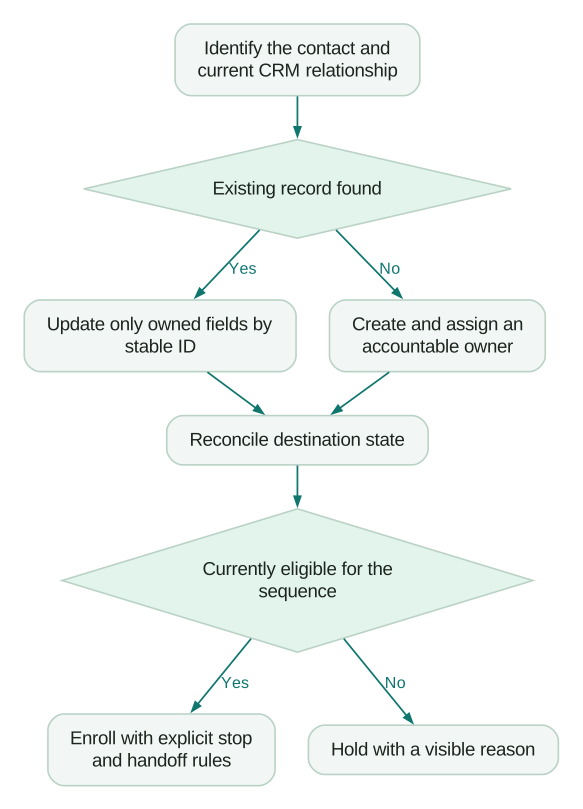
What should pass before you scale?
Use a release set that reflects your operation: a new prospect, an existing customer, an active opportunity, a suppressed contact, a changed employer, a duplicate candidate and a record with incomplete ownership.
Checklist
- The selected integration mode supports the required objects and directions.
- Existing sales ownership survives enrichment unless a defined routing rule changes it.
- CSV and API paths produce the intended result for existing and new records.
- Empty values cannot erase protected information accidentally.
- Current account and contact states control sequence eligibility.
- Replies, absences and suppression events produce the intended stop or handoff.
- Delayed synchronization and a retried write can be reconciled without blind recreation.
For the first production batch, review exceptions with the people receiving the work. A missing next step is as important as a missing field. Then use the Apollo pricing guide to reconcile the cost of the functioning process, and the outbound automation guide to connect it to ongoing sales operations.
Questions people ask
Why does a record have a different owner in Apollo and the CRM?
Ownership depends on the integration, authentication path and destination routing. Check the actual owner field after synchronization and any downstream automation, rather than relying on the creator or the person who imported the record.
Should I enable deduplication for every API write?
First understand whether a matched record will be updated and which supplied fields can change. For known records, explicit ID-based updates and a limited write set are easier to reason about than broad matching.
Why did importing 1,000 rows create fewer than 1,000 contacts?
Some rows may have matched existing records, been skipped or failed validation. Reconcile the input against the resulting IDs and outcomes before treating the count difference as data loss.
Does connecting HubSpot automatically log every sales activity?
The integration mode, activity configuration and associated records all matter. Diagnose those dependencies before recreating records or assuming a missing activity will never synchronize.
What should I fix first in a messy Apollo setup?
Start with identity, ownership and suppression because those affect who receives work and who receives outreach. Then repair field mappings, sequence transitions and reporting around those stable rules.
Sources
- Apollo HubSpot integration overview, accessed 8 September 2026.
- Apollo CRM record ownership, accessed 8 September 2026.
- Apollo CSV contact imports, accessed 8 September 2026.
- Apollo create a contact API, accessed 8 September 2026.
- Apollo sequence rulesets, accessed 8 September 2026.
Written by
Jafrin Akter AloData Engineer and Co-founder, martechdevs
Jafrin Akter Alo is a data engineer and co-founder of martechdevs, where the team has delivered 74+ martech, data and growth stack implementations.