
Apollo vs ZoomInfo for Startups: Choose on Coverage and Cost
Data Engineer and Co-founder, martechdevs
Last updated 12 min read
Apollo is a practical first candidate when a startup wants prospecting and sales execution in one accessible subscription. ZoomInfo deserves evaluation when account intelligence, buying-group research or specific data coverage could materially improve the sales motion. The right purchase depends on your audience and operating requirements, not a universal claim that one database is more accurate.
Last updated: 30 September 2026.
Start with the sales motion you actually have
A founder researching 50 target accounts needs a different system from six representatives calling into complex enterprise buying groups. Before comparing plans, specify who sells, whom they contact, which information is missing and what happens after a contact is found.
For a small team, the useful unit is an accepted target contact that can enter the intended workflow. That means the right person, current employer, relevant role and required contact channel, with applicable suppression and outreach rules satisfied.
A returned email alone is a weaker result. An extensive account profile is also of limited value if nobody uses it to change prioritization, identify another stakeholder or improve a conversation.
Separate three purchasing needs: data access, sales execution and revenue operations. You might need a contact source, sequencing and calling, or maintained enrichment and CRM synchronization. Price the required combination before deciding that one vendor replaces the other.
Where Apollo fits
Shortlist Apollo when a small team wants to research prospects and execute a straightforward sales workflow without assembling several separate interfaces. Its public plans make an initial budget easier to construct, and a limited evaluation can establish whether its data fits your target segment.
That convenience is worth testing with a representative seller's tasks: find suitable accounts, identify the right role, obtain the required contact detail, check existing CRM ownership, prepare outreach and record the result. Count the manual steps and exceptions rather than judging only the search screen.
Do not assume every task shown during a trial belongs to the plan you intend to buy. Specify mailbox needs, calling destinations, automation, CRM behavior and usage volume. Features and consumption are separate parts of the purchase.
Apollo also supports multiple data sources. Its waterfall configuration starts with Apollo and can continue through configured providers, with optional validation. Several returned candidates and validation steps can consume credits. Calling it a single-source database misses part of the current product.
Where ZoomInfo deserves a closer look
ZoomInfo's public plan descriptions separate Professional, Copilot Advanced and Copilot Enterprise. The listed capabilities extend from contact search and integrations to company hierarchy, buying-group indicators, intent, workflows and advanced account information, depending on package. The page directs buyers to pricing inquiries rather than publishing a standard dollar rate for those sales packages.
Evaluate those capabilities when your sale depends on understanding an account beyond one person's email. For example, a rep selling into a corporate group may need to distinguish the operating subsidiary, budget holder and technical stakeholder before deciding whom to approach.
Make the vendor demonstrate that exact account-research task on a representative segment. Ask which fields are populated, how current they are, which exports include them and which package is being shown. A compelling demonstration of an unfamiliar enterprise account is not evidence for your own market.
ZoomInfo's current intent product describes both account-related signals and Person-Level Intent. Do not reduce all of its offering to one generic company-level score. Ask what the particular signal represents, how the person or account association is made, its coverage and how old the observation is.
A signal can help prioritize investigation. It does not establish that a prospect has a funded project, controls the budget or wants a sales message. Require evidence that the information changes a useful decision before paying for a richer package. The signal-based selling guide shows how to preserve the observation, check its age and route a useful next action without overstating purchase intent.
Apollo pricing: compare annual commitment with monthly flexibility
The public Apollo pricing page was checked on 30 September 2026, including its billing toggle. Basic displayed $49 per seat per month billed annually, or $65 month to month. Professional displayed $79 annually or $99 month to month. Organization displayed $119 on annual billing with a three-seat minimum. Taxes are additional.
For three Professional seats, that is $2,844 for a full year on annual billing, compared with $3,564 over twelve monthly payments: a $720 difference before add-ons and usage. Annual billing is a commitment, not a monthly cancellation option at the annual-equivalent rate.
The annual cards list 30,000 credits per Basic seat, 48,000 per Professional seat and 72,000 per Organization seat, granted upfront. Credits are usage units, not a promise of that many complete usable contact records. Model the activities you intend to perform.
Use month-to-month access when the ability to change direction is worth the price difference. A startup still revising its target segment may learn more from a short, well-designed evaluation than from maximizing a discount on an unproven annual workflow.
Build a budget from actions, not just seats
Apollo's credit-usage guide separates categories such as email, phone, enrichment, waterfall, AI research, calling and exports. Some charges depend on the workspace, plan or execution surface. Review the account's applicable rates and usage report rather than applying one multiplier to every action.
List the monthly workload: contacts researched, emails revealed, phone numbers requested, enrichment updates, exports, AI runs and calling activity. Identify which tasks repeat and which reuse existing data. A high credit allowance can still be consumed by a workflow that repeatedly enriches the same records.
Then include the surrounding costs: mailboxes, the CRM, any separate sequencing or dialing product, implementation, training and maintenance. Count an existing subscription as a saving only if you will actually cancel it and its necessary work is covered by the replacement.
For ZoomInfo, request a written quote for the same workload and users. Specify the data fields, locations, export or API access, CRM integration, product modules and usage limits. Ask for the annual commitment, renewal terms, overage treatment and onboarding cost.
Do not substitute a price from an old Reddit contract screenshot for a current quote. It may involve different seats, modules, allowances, discounts and renewal dates. Community reports can suggest questions to ask; they cannot establish the package offered to your company.
Compare coverage and accuracy separately
Coverage asks whether the provider returns the information you need for your target population. Accuracy asks whether the returned information is correct. A larger returned list can still contain fewer usable records.
Use a common evaluation list that reflects your intended audience. Include relevant regions, company sizes, seniority levels, industries and account types. For a contact-level test, establish the intended person and employer independently so you can detect an incorrect match.
Do not let each vendor choose its own easiest sample. Also do not use a list copied from one provider as the sole reference population; that can bias the comparison toward its own coverage.
In an original hypothetical test of 200 target contacts, Provider A returns 150 candidates and 120 pass review. Provider B returns 180 and 135 pass. A has 60% accepted coverage and 80% acceptance among returned candidates. B has 67.5% accepted coverage and 75% acceptance among returned candidates.
B produces 15 more accepted contacts, but it also produces more rejected candidates to inspect. Neither headline alone selects a winner. Compare the additional usable coverage with price, review effort and whether those extra contacts belong to accounts that matter.
These figures are a teaching example, not observed Apollo or ZoomInfo results. Report your own sample size and segment composition. A small difference in one trial does not establish permanent superiority across markets.
Use the same acceptance policy for both
Define what makes an email usable and a phone number suitable for your workflow. Separate identity errors, outdated employment, missing fields, shared company numbers, invalid addresses and inconclusive verification.
Hunter's verification reference explains why valid, accept-all and unknown statuses are different, and why a valid address can still bounce later. Mailbox verification does not establish that the address belongs to the intended decision maker.
For phone-led teams, separate number availability from correct-person reachability and actual conversation outcomes. A number can be valid but belong to a switchboard, be restricted for your intended use or rarely reach the person. Treat those as different findings.
Avoid sending irrelevant messages simply to test a database. Use independent evidence and an appropriate validation process, then evaluate downstream response in a relevant, permitted sales workflow. Otherwise your measurement of “data quality” mixes in poor targeting and unwanted outreach.
Keep a decision record like this original planning example:
comparison: startup_contact_data_evaluation
sample_owner: revenue_operations
target_population: approved_accounts_and_roles
analysis_unit: unique_person_at_current_employer
required_channel: work_email
acceptance_policy: identity_match_and_current_validation
hold_states: [accept_all, unknown, uncertain_employer]
writeback_mode: reviewed_candidates_only
purchase_gate: useful_coverage_and_workflow_fit
The record is not a vendor configuration. Its purpose is to keep the acceptance rule constant while the source changes. If one trial accepts uncertain addresses and another rejects them, the resulting coverage percentages are not comparable.
Test the CRM workflow before trusting the integration label
A working connector can still create duplicates, replace reliable fields or assign records to the wrong owner. Evaluate a small set containing existing prospects, customers, suppressed people, changed employers and genuinely new contacts.
For example, Apollo's HubSpot documentation distinguishes the HubSpot CRM integration from HubSpot Data Enrichment. The former supports record synchronization and activity pushes; the latter enriches existing records without the same two-way record and activity sync. They are not interchangeable implementations.
For every candidate, test the required record types, matching keys, field mappings, ownership and activity visibility. Verify what happens when an existing value is blank, when a salesperson has corrected it, and when the source sends a conflicting update.
Require provenance for enriched fields where it affects trust: source, retrieval time, validation state and acceptance decision. A vendor response arriving today should not automatically outrank a field confirmed yesterday by the customer.
Also test the exit. Establish what can be exported, the permitted use of retained data under the applicable agreement, and how to remove the connector without losing necessary workflow ownership. Do not promise that a dataset remains usable forever after cancellation without checking the actual terms.
When Clay with several providers makes sense
Clay is worth evaluating when the work involves custom selection logic, multiple enrichment paths, research and controlled CRM writeback. The advantage should be a workflow you can operate and inspect, not merely access to more vendor logos.
Clay's waterfall tooling allows ordered providers, input mapping and conditional execution. Its billing model separates Actions from Data Credits. Bringing an existing provider key can remove the relevant marketplace credit charge while leaving platform activity and the external provider's bill.
That arrangement can work well for a team with an owner who maintains the logic and measures incremental accepted coverage. It can become expensive when nobody controls repeated runs, low-quality candidates or downstream changes.
The comparison has changed: ZoomInfo now advertises waterfall enrichment in GTM Studio, using alternative sources when its own contact value is unavailable. The page describes it as included without an additional waterfall fee and retains an Early Access label for GTM Studio. Confirm current eligibility, access and commercial scope; this does not mean the entire platform is free.
Apollo also has its own configured waterfall, described earlier. Evaluate whether Clay adds needed flexibility beyond the capabilities already in your proposed package. “Multiple providers” alone no longer distinguishes it from both alternatives.
Our waterfall enrichment guide shows how to measure the marginal cost of each stage and stop when additional accepted records no longer justify the spend.
Where Lusha fits in the shortlist
Lusha can be another candidate when the immediate need is contact discovery and a manageable data-access workflow. Its current FAQ describes a free plan with 40 monthly credits and self-service paid options. Standard reveal pricing is one credit for an email and five for a phone number; API search and other operations can add charges.
That means 40 credits should not be described as 40 fully enriched email-and-phone contacts. A small free allowance can help inspect the interface and sample data. It does not replace a representative coverage evaluation when your target audience is broad or phone-heavy.
Apply the same requirements to Lusha as to the other candidates: usable coverage, identity confidence, CRM behavior, usage economics and ownership. Choose the shortlist size you can evaluate properly. Running four superficial demos is less informative than completing two comparable workflows.
Turn the trial into a purchase decision
Choose a limited evaluation period with defined tasks and a named decision owner. Keep discovery quality separate from engagement results so you can identify what each product changes.
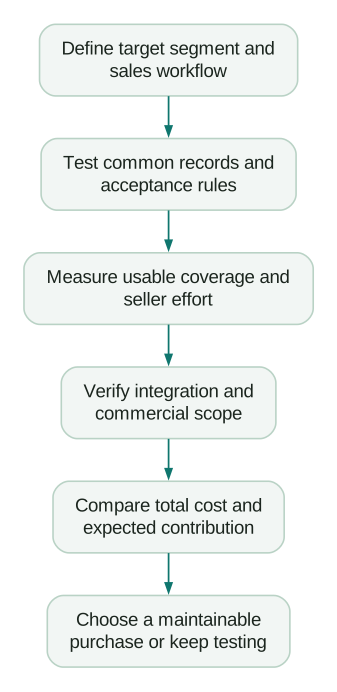
A richer product is justified when its additional capability creates enough value to cover the premium. In an original planning example, a $6,000 annual premium requires two additional wins if each contributes $3,000 after relevant variable delivery costs. Revenue per deal is not the same as contribution, and projected wins are not evidence that the tool caused them.
Ask what must be true for those extra wins to happen: the product identifies relevant accounts you would otherwise miss, reaches a needed stakeholder, or saves capacity that the team actually redeploys. If nobody can describe the mechanism, the return assumption is too vague.
When coverage differences are modest and the sales motion remains uncertain, a smaller reversible commitment can preserve the ability to learn. When a demonstrated capability solves a costly recurring problem, a higher subscription can be the more economical choice.
Before signing:
Checklist
- The target population and required contact channels are explicit.
- Each candidate was evaluated with the same acceptance policy.
- Coverage is separated from accuracy and downstream response.
- Annual-equivalent prices are distinguished from monthly commitments.
- Credit forecasts include the actual enrichment and execution path.
- The proposed plan includes the features shown in the evaluation.
- CRM tests protect customers, suppression, ownership and reliable fields.
- The quote identifies modules, limits, renewal and exit conditions.
- Someone owns the workflow after the purchase.
If the challenge is connecting data sources, qualification and CRM execution, our GTM engineering services can help build and evaluate that workflow. Bring a representative target segment and the actions your team needs to complete; those make the comparison concrete.
Questions people ask
Is Apollo better than ZoomInfo for a startup?
Apollo is often a reasonable first evaluation for a small team that wants accessible prospecting and execution together. ZoomInfo can justify a closer look when specific account intelligence or demonstrated coverage solves a valuable problem. Test the same audience and workflow before deciding.
How much does ZoomInfo cost?
Its public sales-package page does not provide a standard dollar price. Obtain a quote with the users, modules, data access and usage limits you need. Prices from another company's contract are not reliable substitutes for that scope.
Which platform has more accurate data?
There is no defensible universal answer for every segment from a feature comparison alone. Measure correct, current matches on a representative common sample. Separate returned-field coverage, mailbox or number validation, identity accuracy and actual commercial response.
Can Clay replace Apollo or ZoomInfo?
It can replace parts of a workflow when its configured sources and execution cover your requirements. It can also use an existing provider subscription. Include data, platform usage, maintenance and any remaining sales tools in the comparison; do not assume complete replacement from enrichment alone.
Should a founder buy an annual plan immediately?
Only when the workflow and expected use justify the commitment. Compare the discount with the value of flexibility while the audience and sales process are still changing. Finish a representative evaluation before making a larger commitment based on hoped-for usage.
Sources
Written by
Jafrin Akter AloData Engineer and Co-founder, martechdevs
Jafrin Akter Alo is a data engineer and co-founder of martechdevs, where the team has delivered 74+ martech, data and growth stack implementations.